View is a user interface. View displays data from the model to the user and also enables them to modify the data.
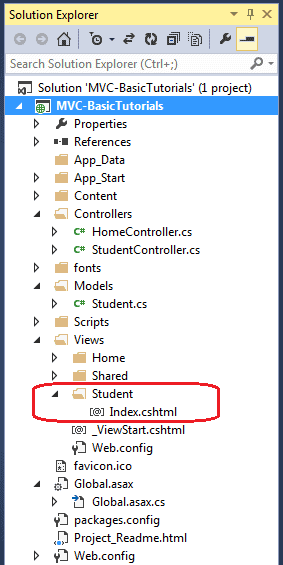
ASP.NET MVC views are stored in Views folder. Different action methods of a single controller class can render different views, so the Views folder contains a separate folder for each controller with the same name as controller, in order to accommodate multiple views. For example, views, which will be rendered from any of the action methods of HomeController, resides in Views > Home folder. In the same way, views which will be rendered from StudentController, will resides in Views > Student folder as shown below.
View folders for Controllers
Note :
Shared folder contains views, layouts or partial views which will be shared among multiple views.
Razor view engine:
Microsoft introduced the Razor view engine and packaged with MVC 3. You can write a mix of html tags and server side code in razor view. Razor uses @ character for server side code instead of traditional <% %>. You can use C# or Visual Basic syntax to write server side code inside razor view. Razor view engine maximize the speed of writing code by minimizing the number of characters and keystrokes required when writing a view. Razor views files have .cshtml or vbhtml extension.
ASP.NET MVC supports following types of view files:
View file extension
Description
.cshtml
C# Razor view. Supports C# with html tags.
.vbhtml
Visual Basic Razor view. Supports Visual Basic
with html tags.
.aspx
ASP.Net web form
.ascx
ASP.NET web control
Learn Razor syntax in the next section. Let's see how to create a new view using Visual Studio 2013 for Web with MVC 5.
Create New View:
We have already created StudentController and Student model in the previous section. Now, let's create a Student view and understand how to use model into view.
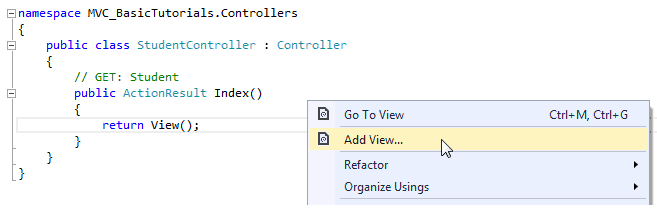
We will create a view, which will be rendered from Index method of StudentContoller. So, open a StudentController class -> right click inside Index method -> click Add View..
Create View
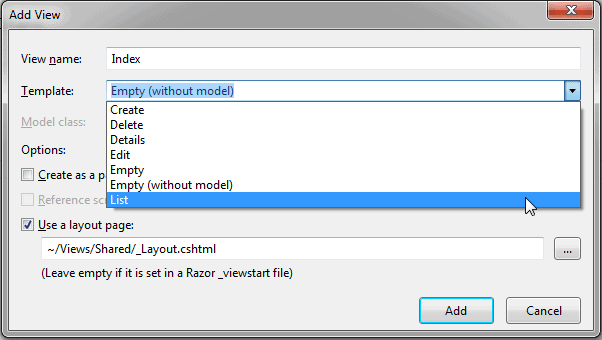
In the Add View dialogue box, keep the view name as Index. It's good practice to keep the view name the same as the action method name so that you don't have to specify view name explicitly in the action method while returning the view.
Select the scaffolding template. Template dropdown will show default templates available for Create, Delete, Details, Edit, List or Empty view. Select "List" template because we want to show list of students in the view.
View
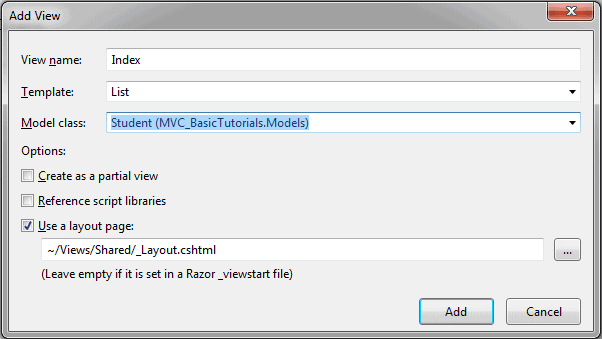
Now, select Student from the Model class dropdrown. Model class dropdown automatically displays the name of all the classes in the Model folder. We have already created Student Model class in the previous section, so it would be included in the dropdown.
View
Check "Use a layout page" checkbox and select _Layout.cshtml page for this view and then click Addbutton. We will see later what is layout page but for now think it like a master page in MVC.
This will create Index view under View -> Student folder as shown below:
View
The following code snippet shows an Index.cshtml created above.
<td>@Html.ActionLink("Edit", "Edit", new { id=item.StudentId }) |
@Html.ActionLink("Details", "Details", new { id=item.StudentId }) |
@Html.ActionLink("Delete", "Delete", new { id = item.StudentId })
</td></tr>
}
</table>
As you can see in the above Index view, it contains both Html and razor codes. Inline razor expression starts with @ symbol. @Html is a helper class to generate html controls. You will learn razor syntax and html helpers in the coming sections.
The Controller in MVC architecture handles any incoming URL request. Controller is a class, derived from the base class System.Web.Mvc.Controller. Controller class contains public methods called Action methods. Controller and its action method handles incoming browser requests, retrieves necessary model data and returns appropriate responses.
In ASP.NET MVC, every controller class name must end with a word "Controller". For example, controller for home page must be HomeController and controller for student must be StudentController. Also, every controller class must be located in Controller folder of MVC folder structure.
Adding New Controller:
Now, let's add a new empty controller using Visual Studio 2013 for Web and MVC 5.
In the previous section we learned how to create our first MVC application, which in turn created a default HomeController. Here, we will create a new StudentController.
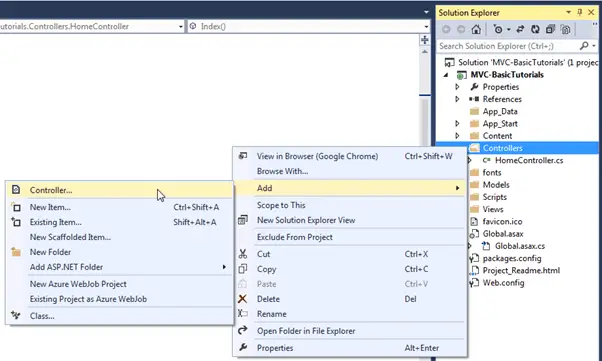
In the Visual Studio, right click on the Controller folder -> select Add -> click on Controller..
Add New Controller
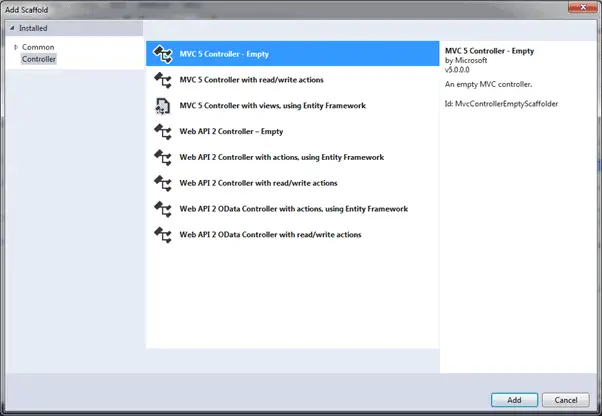
This opens Add Scaffold dialog as shown below. (Visual Studio 2013 introduced the Add New Scaffold Item dialog. This dialog replaced the Add View/Add Controllers dialog seen in the earlier version of Visual Studio.)
Note :
Scaffolding is an automatic code generation framework for ASP.NET web applications. Scaffolding reduces the time taken to develop a controller, view etc. In MVC framework You can develop a customized scaffolding template using T4 templates as per your architecture and coding standard.
Controller
Add Scaffold dialog contains different templates to create a new controller. We will learn about other templates later. For now, select "MVC 5 Controller - Empty" and click Add. It will open Add Controller dialog as shown below
Controller
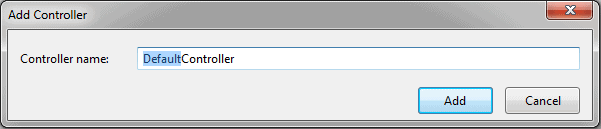
In the Add Controller dialog, enter the name of the controller. Remember, controller name must end with Controller. Let's enter StudentController and click Add.
Controller
This will create StudentController class with Index method in StudentController.cs file under Controllers folder, as shown below.
StudentController in C#:
using System;
using System.Collections.Generic;
using System.Linq;
using System.Web;
using System.Web.Mvc;
namespace MVC_BasicTutorials.Controllers
{
publicclassStudentController : Controller
{
// GET: StudentpublicActionResult Index()
{
return View();
}
}
}
As you can see above, the StudentController class is derived from Controller class. Every controller in MVC must derived from this abstract Controller class. This base Controller class contains helper methods that can be used for various purposes.
Now, we will return a dummy string from Index action method of above StudentController. Changing the return type of Index method from ActionResult to string and returning dummy string is shown below. You will learn about ActionResult in the next section.
StudentController in C#:
using System;
using System.Collections.Generic;
using System.Linq;
using System.Web;
using System.Web.Mvc;
namespace MVC_BasicTutorials.Controllers
{
publicclassStudentController : Controller
{
// GET: Studentpublicstring Index()
{
return"This is Index action method of StudentController";
}
}
}
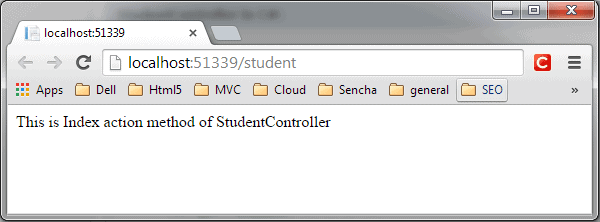
We have already seen in the routing section that the URL request http://localhost/student or http://localhost/student/index is handled by the Index() method of StudentController class, shown above. So let's invoke it from the browser and you will see the following page in the browser.
Model represents domain specific data and business logic in MVC architecture. It maintains the data of the application. Model objects retrieve and store model state in the persistence store like a database.
Model class holds data in public properties. All the Model classes reside in the Model folder in MVC folder structure.
Let's see how to add model class in ASP.NET MVC.
Adding Model:
Open our first MVC project created in previous step in the Visual Studio. Right click on Model folder -> Add -> click on Class..
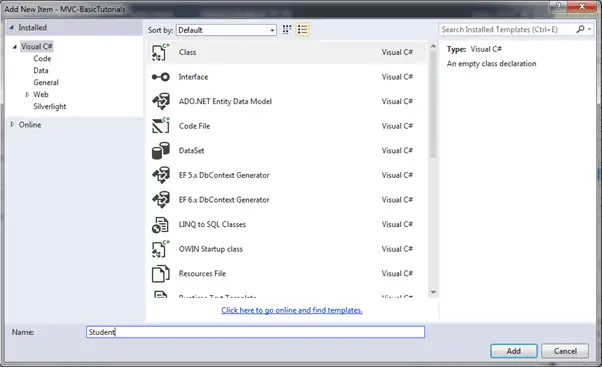
In the Add New Item dialog box, enter class name 'Student' and click Add.
Create Model Class
This will add new Student class in model folder. Now, add Id, Name, Age properties as shown below.
In this section, you will get an overview of MVC architecture. The MVC architectural pattern has existed for a long time in software engineering. All most all the languages use MVC with slight variation, but conceptually it remains the same.
Let's understand the MVC architecture in ASP.NET.
MVC stands for Model, View and Controller. MVC separates application into three components - Model, View and Controller.
Model: Model represents shape of the data and business logic. It maintains the data of the application. Model objects retrieve and store model state in a database.
Model is a data and business logic.
View: View is a user interface. View display data using model to the user and also enables them to modify the data.
View is a User Interface.
Controller: Controller handles the user request. Typically, user interact with View, which in-tern raises appropriate URL request, this request will be handled by a controller. The controller renders the appropriate view with the model data as a response.
Controller is a request handler.
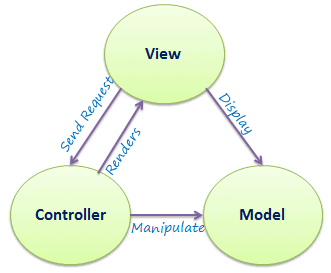
The following figure illustrates the interaction between Model, View and Controller.
MVC Architecture
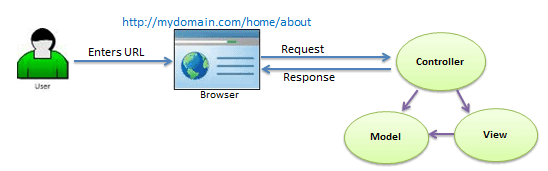
The following figure illustrates the flow of the user's request in ASP.NET MVC.
Request/Response in MVC Architecture
As per the above figure, when the user enters a URL in the browser, it goes to the server and calls appropriate controller. Then, the Controller uses the appropriate View and Model and creates the response and sends it back to the user. We will see the details of the interaction in the next few sections.